iframeで構成された3ペインUIの表示幅をドラッグ&ドロップで変更する
はじめに
ちょっとお仕事で必要が生じて、iframe 3枚から成る3ペインUIの各ペインの境界線をドラッグ&ドロップして表示幅を変更するという機能を実装することになったので、その検証メモ。
だいたいこんなイメージ。
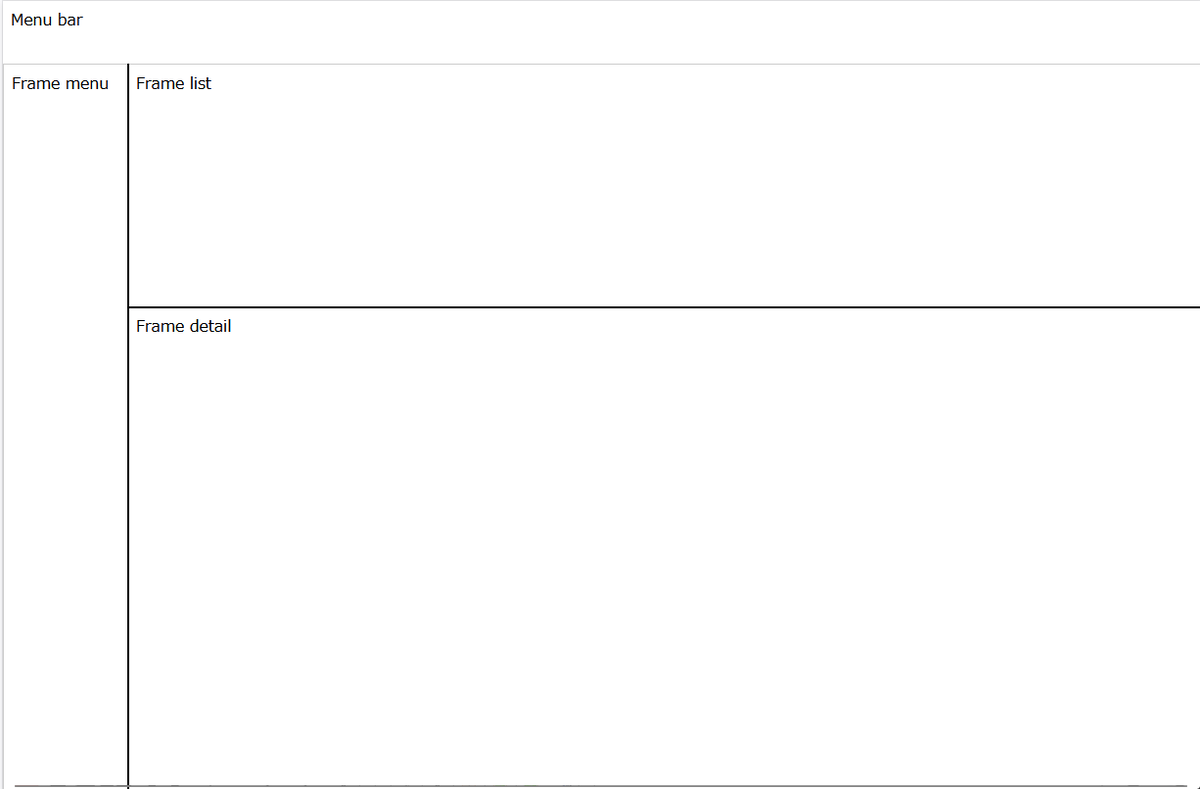
今回は、Laravelを使って組んでいく。
なお、実行環境は以下だが、構築の詳細は割愛。
- VirtualBox 7.1.0
- AlmaLinux 9.4
- PHP 8.3.22
下準備
まずはLaravelのプロジェクトを作る。
cd /var/www/html
composer create-project laravel/laravel:11.* sample01
chmod -R a+w  sample01/storage/
chmod a+w  sample01/bootstrap/cache
お仕事がLaravel 11なので、バージョンとしてLaravel 11系を指定しているが、最新のLaravel 12系でも問題なく動くと思う。
ファイルの作成・編集
sample01/resources/views/sample/css-js.blade.php
<!DOCTYPE html>
<html>

<head>
    <base href="/sample01/public/" />
    <script src="https://code.jquery.com/jquery-3.7.1.min.js"></script>
    <link rel="stylesheet" type="text/css" href="sample.css" />
    <script src="sample.js" type="text/javascript"></script>
</head>

<body>
    <div>
        Menu bar
    </div>
    <div class="iframe-container-menu">
        <iframe class="menu resizable-iframe" src="frame-menu"></iframe>
    </div>
    <div class="resize-handle-vertical"></div>
    <div class="iframe-container-list">
        <iframe class="list resizable-iframe" src="frame-list"></iframe>
    </div>
    <div class="resize-handle-horizontal"></div>
    <div class="iframe-container-detail">
        <iframe class="detail resizable-iframe" src="frame-detail"></iframe>
    </div>
    <script type="text/javascript">
        document.body.style.pointerEvents = "auto";
    </script>
</body>

</html>
sample01/public/sample.css
.iframe-container-menu {
    position: absolute;
    top: 4em;
    left: 0;
    width: calc(20% - 2px);
    height: calc(100% - 4em - 2px);
}

.iframe-container-list {
    position: absolute;
    top: 4em;
    right: 0;
    width: calc(80% - 2px - 2px);
    height: calc(30% - 4em - 2px);
}

.iframe-container-detail {
    position: absolute;
    bottom: 0;
    right: 0;
    width: calc(80% - 2px - 2px);
    height: calc(70% - 2px - 2px);
}

.iframe-container-menu,
.iframe-container-list,
.iframe-container-detail {
    border: 1px solid #ccc;
    overflow: hidden;
}

.resizable-iframe {
    width: 100%;
    height: 100%;
    border: none;
    /* pointer-events: none; */
    /* iframe内のコンテンツにマウスイベントを渡さない */
}

.resize-handle-vertical {
    position: absolute;
    left: calc(20% - 2px);
    top: 4em;
    width: 2px;
    height: calc(100% - 4em);
    cursor: ew-resize;
    background: #000;
    z-index: 1;
}

.resize-handle-horizontal {
    position: absolute;
    left: 20%;
    top: 30%;
    width: 80%;
    height: 2px;
    cursor: ns-resize;
    background: #000;
    z-index: 1;
}
sample01/public/sample.js
// ドラッグ&ドロップによる3-paneのリサイズ
$(function () {
    const containerMenu = document.querySelector(".iframe-container-menu");
    const containerList = document.querySelector(".iframe-container-list");
    const containerDetail = document.querySelector(".iframe-container-detail");
    const handleVertical = document.querySelector(".resize-handle-vertical");
    const handleHorizontal = document.querySelector(
        ".resize-handle-horizontal"
    );

    let isResizingVertical = false;
    let isResizingHorizontal = false;

    handleVertical.addEventListener("mousedown", function (e) {
        isResizingVertical = true;
        document.body.style.pointerEvents = "none";
        document.body.style.userSelect = "none";
    });
    handleHorizontal.addEventListener("mousedown", function (e) {
        isResizingHorizontal = true;
        document.body.style.pointerEvents = "none";
        document.body.style.userSelect = "none";
    });

    document.addEventListener("mousemove", function (e) {
        if (!isResizingVertical && !isResizingHorizontal) {
            return;
        }

        if (isResizingVertical) {
            if (
                containerMenu.offsetLeft + 50 >= e.clientX ||
                e.clientX >= window.innerWidth - 50
            ) {
                return;
            }

            // コンテナの新しいサイズを計算
            const newWidth = e.clientX - containerMenu.offsetLeft;

            // サイズを更新
            containerMenu.style.width = newWidth + "px";
            handleVertical.style.left = e.clientX + "px";
            containerList.style.width = "calc(100% - " + newWidth + "px)";
            containerList.style.left = e.clientX + "px";
            containerDetail.style.width = "calc(100% - " + newWidth + "px)";
            containerDetail.style.left = e.clientX + "px";
            handleHorizontal.style.width = "calc(100% - " + newWidth + "px)";
            handleHorizontal.style.left = e.clientX + "px";
        }
        if (isResizingHorizontal) {
            if (
                containerMenu.offsetTop + 50 >= e.clientY ||
                e.clientY >= window.innerHeight - 50
            ) {
                return;
            }

            // コンテナの新しいサイズを計算
            const newHeight = e.clientY - containerList.offsetTop;

            // サイズを更新
            containerList.style.height = newHeight + "px";
            handleHorizontal.style.top = e.clientY + "px";
            containerDetail.style.height =
                "calc(100% - " + newHeight + "px - 4em - 2px)";
            containerDetail.style.top = e.clientY + "px";
        }
    });

    document.addEventListener("mouseup", function (e) {
        if (isResizingVertical) {
            // e.clientX をDBに保存
            save({
                x: e.clientX,
            });
        }
        if (isResizingHorizontal) {
            // e.clientY をDBに保存
            save({
                y: e.clientY,
            });
        }

        isResizingVertical = false;
        isResizingHorizontal = false;
        document.body.style.pointerEvents = "auto";
        document.body.style.userSelect = "auto";
    });

    // clientX、clientY をDBから読み込んで初期位置を変更
    $.ajax({
        type: "get",
        url: "sample/load",
        dataType: "json",
    })
        .done((result) => {
            if (result.status) {
                if (result.x >= 0) {
                    // コンテナの新しいサイズを計算
                    const newWidth = result.x - containerMenu.offsetLeft;

                    // サイズを更新
                    containerMenu.style.width = newWidth + "px";
                    handleVertical.style.left = result.x + "px";
                    containerList.style.width =
                        "calc(100% - " + newWidth + "px)";
                    containerList.style.left = result.x + "px";
                    containerDetail.style.width =
                        "calc(100% - " + newWidth + "px)";
                    containerDetail.style.left = result.x + "px";
                    handleHorizontal.style.width =
                        "calc(100% - " + newWidth + "px)";
                    handleHorizontal.style.left = result.x + "px";
                }

                if (result.y >= 0) {
                    // コンテナの新しいサイズを計算
                    const newHeight = result.y - containerList.offsetTop;

                    // サイズを更新
                    containerList.style.height = newHeight + "px";
                    handleHorizontal.style.top = result.y + "px";
                    containerDetail.style.height =
                        "calc(100% - " + newHeight + "px - 4em - 2px)";
                    containerDetail.style.top = result.y + "px";
                }
            }
        })
        .fail((jqXHR, textStatus, errorThrown) => {
            alert("Ajax通信に失敗しました。");
            console.log("jqXHR          : " + jqXHR.status); // HTTPステータスを表示
            console.log("textStatus     : " + textStatus); // タイムアウト、パースエラーなどのエラー情報を表示
            console.log("errorThrown    : " + errorThrown.message); // 例外情報を表示
        });

    function save(data) {
        $.ajax({
            type: "get",
            url: "sample/save",
            dataType: "json",
            data: data,
        })
            .done((result) => {
                // alert(result.status + " " + e.clientY);
            })
            .fail((jqXHR, textStatus, errorThrown) => {
                alert("Ajax通信に失敗しました。");
                console.log("jqXHR          : " + jqXHR.status); // HTTPステータスを表示
                console.log("textStatus     : " + textStatus); // タイムアウト、パースエラーなどのエラー情報を表示
                console.log("errorThrown    : " + errorThrown.message); // 例外情報を表示
            });
    }
});
sample01/app/Http/Controllers/SampleController.php
最初に、以下のコマンドでファイルを作っても良い。
( cd sample01 ; php artisan make:controller '\App\Http\Controllers\SampleController' )
ファイルの内容は以下のようにする。
<?php

namespace App\Http\Controllers;

use Illuminate\Http\Request;
use Illuminate\Support\Facades\Session;

class SampleController extends Controller
{
    public function load()
    {
        // TODO 本当はDBから読み込む
        echo json_encode([
            'status' => true,
            'x' => Session::has('X') ? Session::get('X') : -1,
            'y' => Session::has('Y') ? Session::get('Y') : -1,
        ]);
    }
    public function save(Request $request)
    {
        $x = $request->get('x');
        if (isset($x)) {
            $data = [];
            $data['ItemName'] = 'X';
            $data['Value'] = $x;
            // TODO 本当はDBに格納する
            Session::put($data['ItemName'], $data['Value']);
        }

        $y = $request->get('y');
        if (isset($y)) {
            $data = [];
            $data['ItemName'] = 'Y';
            $data['Value'] = $y;
            // TODO 本当はDBに格納する
            Session::put($data['ItemName'], $data['Value']);
        }

        echo json_encode(['status' => true]);
    }
}
sample01/routes/web.php
<?php

use Illuminate\Support\Facades\Route;

Route::get('/', function () {
    return view('welcome');
});

Route::get('/sample/css-js', function () {
    return view('sample.css-js');
});

Route::get('/sample/load', [\App\Http\Controllers\SampleController::class, 'load']);
Route::get('/sample/save', [\App\Http\Controllers\SampleController::class, 'save']);

Route::get('/frame-menu', function () {
    echo 'Frame menu';
});
Route::get('/frame-list', function () {
    echo 'Frame list';
});
Route::get('/frame-detail', function () {
    echo 'Frame detail';
});
動作確認
ここまでできたら、以下のURLにアクセスする。
http://<your-ip-address>/sample01/public/sample/css-js
これで冒頭のような画面が出てきて、境界線をドラッグ&ドロップできれば完成。
課題
- 万が一、境界線が画面外に行くような事態になった時のために、設定のリセット機能はあった方がいいかもしれない ** 大きいウィンドウで右端、下端まで境界線を移動させておいて、別の小さいウィンドウで開いたとき、など
参考
Geminiに助けてもらってました。
